


You will not be allowed to compare more than 4 products at a time
View compareYolink Diy Automatic Water Leak Detection & Shut-Off Starter Kit, Valve Operator, Wireless Valve Controller, (3) Leak Sensors, H
Yolink Diy Automatic Water Leak Detection & Shut-Off Starter Kit, Valve Operator, Wireless Valve Controller, (3) Leak Sensors, H
Out of stock
Regular price
$459.71
Sale price
$459.71
Regular price
$459.71
Unit price
per
Shipping calculated at checkout.
Sold by GroceryeShop — Fresh & quality products, delivered in USA.
Returns accepted within 30 days | support@groceryeshop.us
Shipping Information
- Free Standard Shipping — United States only
- Processing Time: 3–5 business days
- Estimated Delivery: 6–10 business days after dispatch
- Securely packed to ensure your purchase arrives in perfect condition
- Tracking number sent via email once dispatched
- Orders over $250 require signature upon delivery. Taxes calculated at checkout.
Returns & Refund
Returns accepted within 30 days of delivery.
Damaged or Defective Item
Free return shipping + replacement or full refund
Wrong Item Received
Free return shipping + replacement or full refund
Change of Mind
Return shipping at customer's expense · Item must be unused & in original packaging
All returns require a Return Authorization (RA) number before sending.
View Full Return & Refund Policy
Safety & Compliance
⚠️
California Proposition 65 Warning
Some products sold on this website may expose you to chemicals known to the State of California to cause cancer, birth defects, or other reproductive harm.
www.P65Warnings.ca.gov
🛒
General Product Safety Advisory
Always read the product label, instructions, and safety warnings before use. Do not use damaged or modified products. Store products in appropriate conditions as specified by the manufacturer.
Keep all products out of reach of children unless specifically designed for their use.
ℹ️
Product Authenticity & Notice
All products sold by GroceryeShop are 100% authentic, sourced directly from trusted suppliers across the USA. Product weights and packaging may vary slightly from images due to seasonal availability and supplier updates.
GroceryeShop — Fresh, Quality Groceries Delivered Nationwide.
Couldn't load pickup availability
Guarantee safe and secure checkout


Product Description
Package List: 1 x Hub 1 x Valve Controller 1 x Operator 3 x Water Leak Sensor
Frequently Asked Questions
- Q: What materials are used in the YoLink Water Leak Detection Kit? A: The kit is primarily made of plastic. This durable material ensures longevity and reliability in detecting water leaks.
- Q: How many leak sensors are included in the kit? A: The kit includes three water leak sensors. These sensors are essential for comprehensive leak detection throughout your home.
- Q: What is the communication range of the YoLink system? A: The communication range is up to one quarter mile. This long-range connectivity allows placement of sensors in hard-to-reach areas.
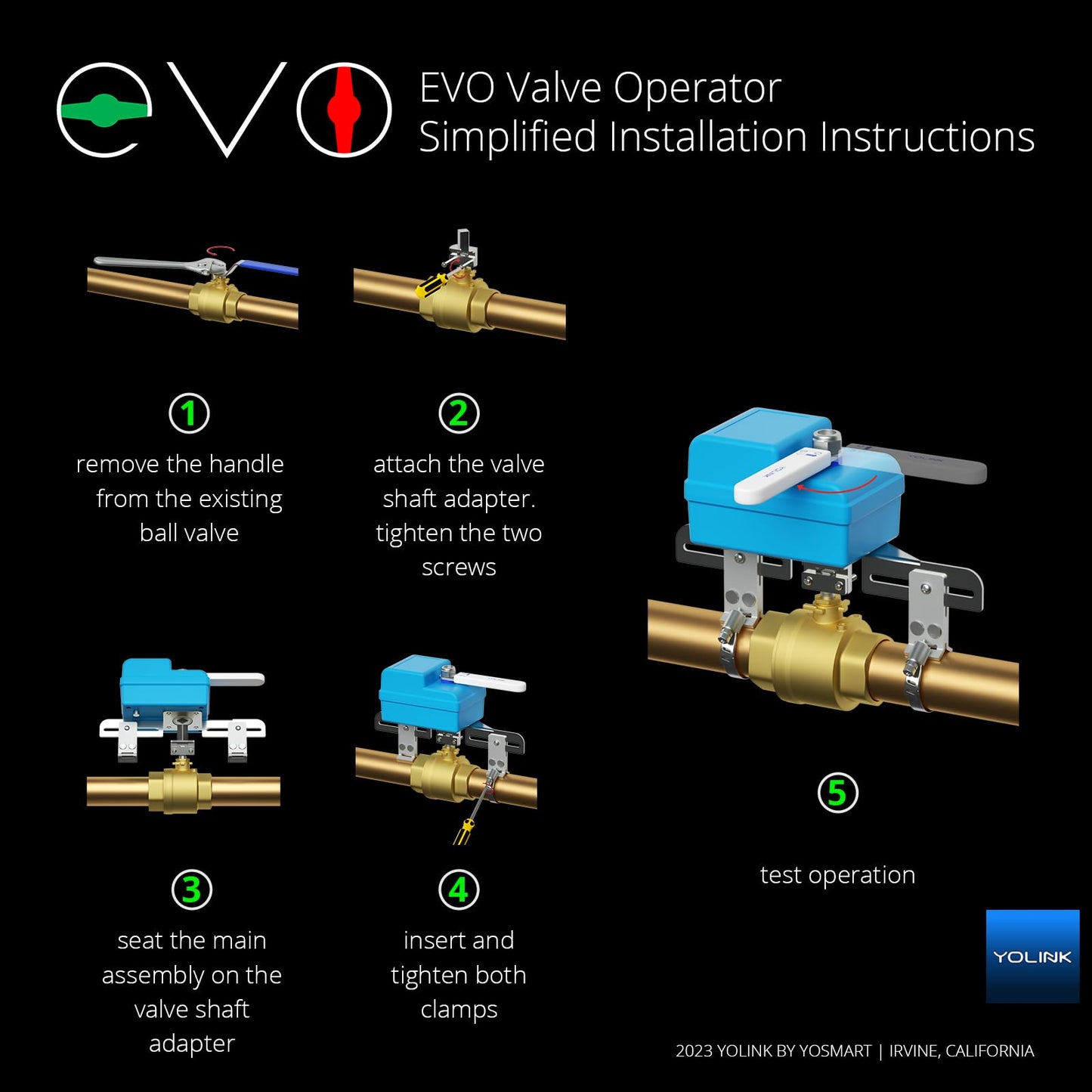
- Q: How do I install the YoLink Water Leak Detection Kit? A: Installation is easy and requires no plumbing. Simply configure the hub, leak sensors, and valve controller to start monitoring.
- Q: Can the system operate without internet or power? A: Yes, it can operate without internet or power. The unique device-to-device functionality allows the system to work independently during power outages.
- Q: How do I customize notifications for leaks? A: You can choose from SMS, app alerts, and email notifications. iOS users will receive critical alerts for immediate awareness.
- Q: How should I care for the water leak sensors? A: To keep sensors in good condition, ensure they are placed in recommended areas and check battery status regularly. The sensors can last up to five years on a single battery.
- Q: Is the valve controller easy to install? A: Yes, the valve controller is easy to install. It integrates seamlessly with your existing water system without cutting pipes.
- Q: What should I do if a leak is detected? A: When a leak is detected, the valve automatically closes. This action prevents water damage without needing manual intervention.
- Q: Can the system be integrated with smart home devices? A: Yes, it integrates with Alexa, Google Assistant, IFTTT, and Home Assistant. This allows for voice control and automation of your water security.
- Q: What happens if the system arrives damaged? A: If the system arrives damaged, you should contact customer support for assistance. They can guide you through the return or replacement process.
- Q: Does the water leak sensor require frequent battery changes? A: No, the water leak sensors have a battery life of up to five years. This minimizes the need for frequent maintenance.
- Q: What is the warranty policy for the YoLink system? A: The warranty policy typically covers manufacturing defects. Check the product documentation for specific details regarding the warranty period.
- Q: Can I monitor multiple locations with this kit? A: Yes, you can monitor multiple locations by strategically placing the three leak sensors. This setup enhances overall protection.
- Q: Is this kit suitable for both homes and businesses? A: Yes, the kit is suitable for both homes and businesses. It provides versatile leak protection for various environments.
- Q: How do I reset the system if needed? A: To reset the system, consult the user manual for specific instructions. Usually, it involves pressing a reset button on the hub.